 Glide Vizion
Troubleshooting
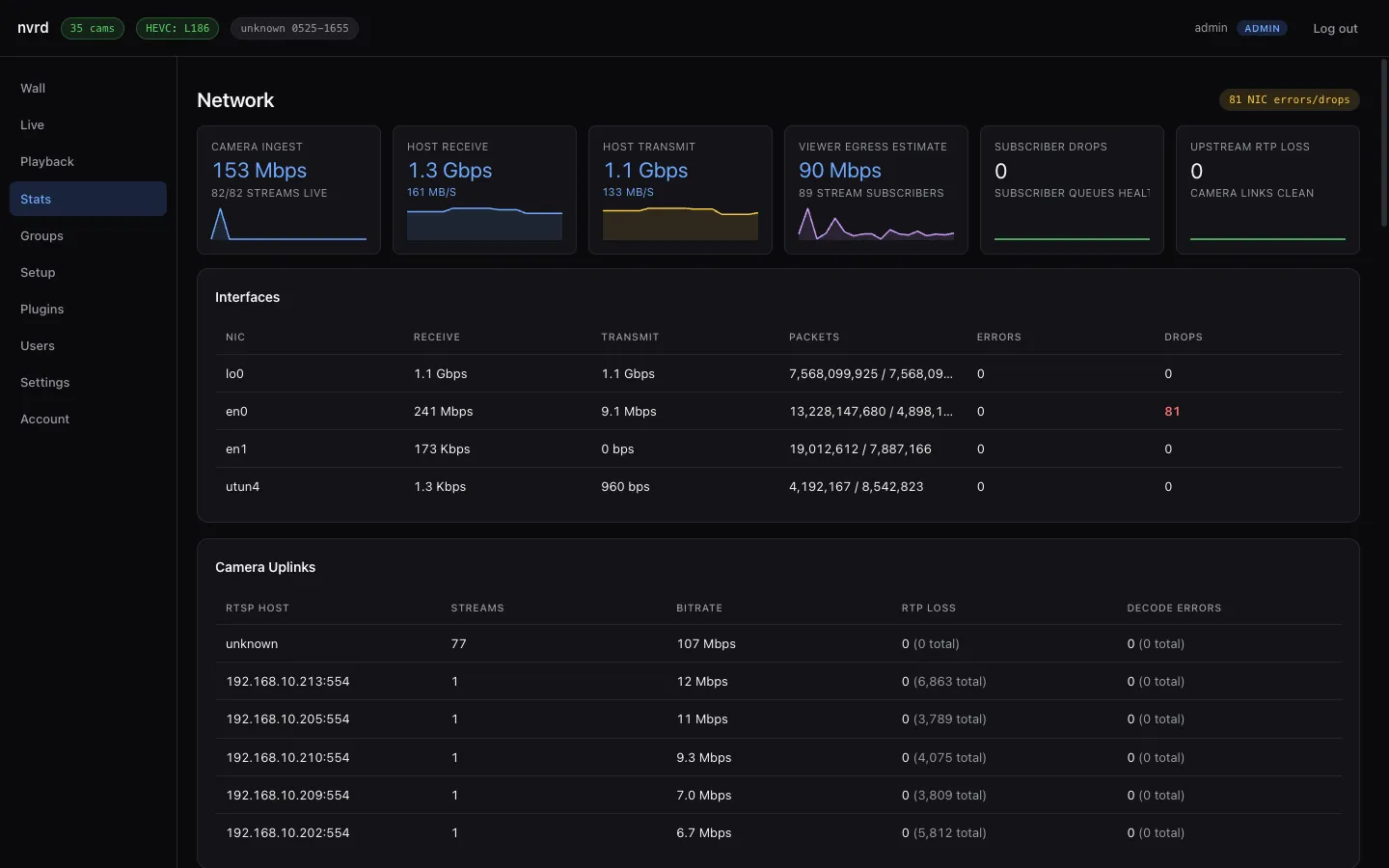
Most problems show up in one place. Start with the Stats page — it tells you what every camera link and the host network are actually doing right now.
Start at the Stats page#
Stats shows camera ingest, host throughput, viewer egress, and — per camera — bitrate, RTP loss, and decode errors. Clean links read 0 loss and 0 decode errors; a camera with climbing RTP loss or a link that won’t come up is your culprit.
A camera won’t connect#
- Check the RTSP URL, username, and password in
config.yaml. A wrong path or password shows up as a link that never establishes. - Make sure the host can reach the camera on its network — cameras are often on a separate VLAN. If the daemon is the only thing that talks to the cameras, that’s expected: clients fan out from NVR, they never hit the camera directly.
- Older Hikvision cameras with Stream Encryption enabled won’t hand over a playable stream. Disable it on the camera.
Video is black or garbled#
- This is almost always a codec issue. Native H.265 (HEVC) playback needs Safari, Chrome 107+, or Edge on a Mac. Other browsers should automatically get the H.264 compatibility stream — if they show a message instead, hard-refresh and check the browser console for the fallback kicking in.
- A single garbled tile with rising decode errors in Stats points at packet loss on that camera’s link, not the browser — see below.
High RTP loss or dropped frames#
- RTP loss means packets aren’t arriving intact — check cabling, switch, and Wi-Fi for that camera. Wired cameras on the same VLAN should read zero.
- On a high-bitrate main stream that logs RTP buffer or reorder errors, raise the per-stream transport buffers (
write_queue_size,udp_read_buffer_size) in that stream’s config. Most setups never need this.
Recording isn’t happening#
- Confirm the camera has
record: true(orstorage.record_by_defaultis on). A live-only camera shows in the grid but writes nothing. - Check free disk space and your retention settings — if
max_age_hours,total_gb, ormin_free_gbare evicting aggressively, old footage disappears sooner than you expect. See Recording & retention.
The timeline shows the wrong time#
Some older Hikvision cameras revert their clock to 1970 after a power blip, which corrupts the recorded timeline. Enable time_sync in the config so NVR pushes the correct time to each camera and keeps it there.
Still stuck?#
Turn on debug logging for one run with NVRD_DEBUG=1 (or server.debug: true in the config) — it correlates HTTP timing, RTSP ingest, recorder, and playback behavior in the logs. Then restart from the Settings page and reproduce the issue.